Wednesday, 7 March 2018

COMPATIBLE BROTHER INK CARTRIDGE LC223 BK/C/M/Y 4PCS/PACK

COMPATIBLE BROTHER INK CARTRIDGE LC223 BK-BLACK/C-CYAN/M-MAGENTA/Y-YELLOW 4PCs/PACK
COLOUR : 1 BLACK ,1 CYAN,1 MAGENTA,1 YELLOW
MODEL : LC223-BROTHER
OEM : LC223
TYPE : INK CARTRIDGE
VOLUME : FULL
REMARKS : WITH CHIP
COMPATIBLE WITH : Brother DCP-J562DW /Brother DCP-J4120DW/Brother MFC-J480DW/Brother MFC-J680DW/Brother MFC-J880DW/Brother MFC-J4620DW/Brother MFC-J5720DW/Brother MFC-J5320DW


Sunday, 4 March 2018

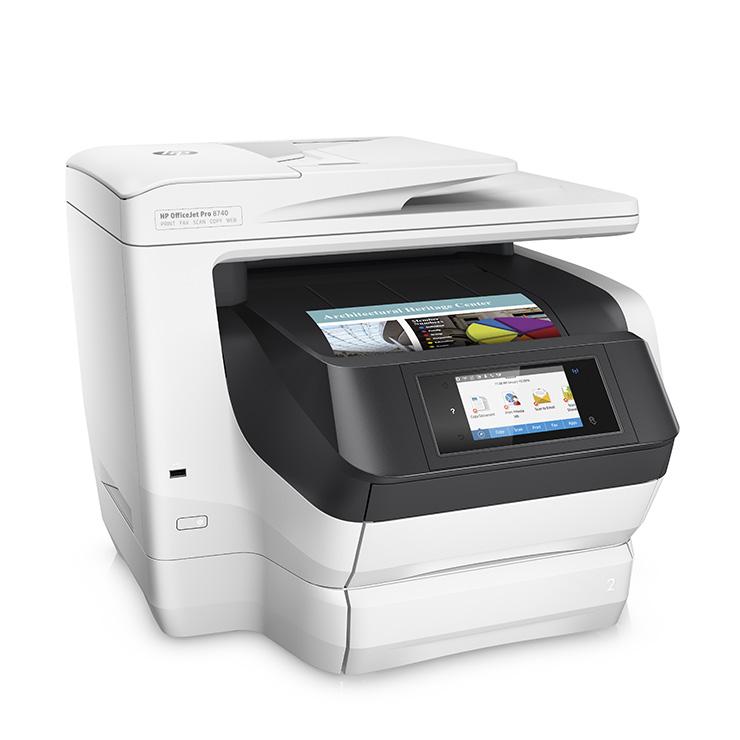
BEST INK JET PRINTER MARCH 2018: HP OFFICEJET PRO 8740 ALL-IN-ONE PRINTER

Best Ink Jet Printer MARCH 2018: HP OfficeJet Pro 8740 All-in-One Printer

Clearly designed for office use, the HP OfficeJet Pro 8740 All-in-One Printer is one of the more elite inkjet multifunction printers (MFPs)available. It offers a level of speed, paper handling, and features that are more often found in color laser MFPs than in inkjets. And much like most color laser MFPs, it’s big enough that you won’t want it sitting on your desk. Assuming you can find room for it, however, it’s an excellent choice for a micro office or a small office or workgroup.


IPrintHub HP OfficeJet Pro 8740

  • PROS :Excellent paper capacity. Touch-screen controls. Prints, scans, copies, and faxes. Ethernet, Wi-Fi, Wi-Fi Direct, and NFC. Prints from and scans to USB key. Prints through the cloud and from mobile devices.
  • CONS : Text can smudge if it gets wet.
  • BOTTOM LINE : The HP OfficeJet Pro 8740 All-in-One Printer competes more directly with color laser multifunction printers than with typical inkjets, delivering speed and paper capacity that works well for moderate-duty use in a small office.

IPrintHub HP OfficeJet Pro 8740

The Basics and More
Basic MFP features for the 8740 include the ability to print and fax from, as well as scan to, a PC; work as a standalone copier and fax machine; and both print from and scan to a USB memory key. The 4.3-inch color touch screen offers an easy-to-use set of menus for giving commands and even the option to customize it somewhat.
If you connect the printer to a network, using either Ethernet or Wi-Fi, you can print to it through the cloud or connect to it through an access point on the network to print from or scan to iOS and Android phones and tablets. You can also use the front-panel touch screen to take advantage of HP Print Apps to print from various cloud sites.
If you choose to connect to a single PC via USB cable instead, you won’t be able to print through the cloud or use the Print Apps. However, the printer’s Wi-Fi Direct will still let you connect directly from mobile devices to print and scan. If your phone or tablet offers NFC, you can also establish the Wi-Fi Direct connection simply by tapping the device to the NFC logo on the MFP’s control panel.
For scanning, the 8740 offers better paper handling than most small-office MFPs, with a legal-size, rather than letter-size, flatbed, along with a 50-sheet automatic document feeder (ADF) for up to legal-size paper. Even better, the 8740 offers true duplex scanning, rather than limiting you to simplex scanning, or even a duplexing ADF, which takes the slower approach of scanning one side, turning the page over, and scanning the second side. Like most MFPs that can both scan and print in duplex, the 8740 lets you copy both simplex and duplex originals to your choice of simplex or duplex copies.

IPrintHub HP OfficeJet Pro 8740

SPEC DATA:

HP OfficeJet Pro 8740 All-in-One Printer

Printer Category: Ink Jet
Type: All-In-One
Color or Monochrome: 1-pass color
Ink Jet Type: Standard All-Purpose
Connection Type: USB, Ethernet, Wireless
Maximum Standard Paper Size: Legal
Number of Cartridges: 4
Number of Ink Colors: 4
Direct Printing from Cameras: No
LCD Preview Screen: No
Scanner Type: Flatbed with ADF (Standard or Optional)
Scanner Optical Resolution: 1200 pixels per inch
Maximum Scan Area: Legal
Standalone Copier and Fax: Copier, Fax
Duty Cycle: 30,000 pages per month

Input Capacity (printer input only): 250 + 250 sheets
Print Duplexing: Automatic
Duplexing Scans: Duplexing Scanner (reads both sides at once)
Cost Per Page (Mono): 1.7 cents
Cost Per Page (Color): 7.7 cents
Water/smudge proof or resistant: Yes
Tech Support: Phone (during warranty period), Web, Email. One-year warranty.
Business Applications – DEFAULT SETTINGS – Adobe Acrobat 8 – 4 pages, text and photos (landscape): 0:35 (min:sec)
Business Applications – DEFAULT SETTINGS – Microsoft Excel 2003 – 1 page, table A (with grid): 0:16 (min:sec)
Business Applications – DEFAULT SETTINGS – Microsoft Excel 2003 – 1 page, graph: 0:15 (min:sec)
Business Applications – DEFAULT SETTINGS – Microsoft Excel 2003 – 3 pages, charts and graphs: 0:34 (min:sec)
Business Applications – DEFAULT SETTINGS – Microsoft PowerPoint 2003 – 4 full-page slides: 0:31 (min:sec)
Business Applications – DEFAULT SETTINGS – Microsoft Word 2003 – 2 pages, text: 0:11 (min:sec)
Business Applications – DEFAULT SETTINGS – Total output time : 2:22 (min:sec)
Business Applications – DEFAULT SETTINGS – Effective PPM (pages per minute): 6.3 (min:sec)
Photos – HIGH -QUALITY SETTINGS – Adobe Photoshop 7 – Average output time per print: 4″ x 6″ prints : 0:51 (min:sec)
BENCHMARK
Business Applications – DEFAULT SETTINGS – Microsoft Excel 2003 – 1 page, graph0:15
Business Applications – DEFAULT SETTINGS – Adobe Acrobat 8 – 4 pages, text and photos (landscape)0:35
Business Applications – DEFAULT SETTINGS – Microsoft PowerPoint 2003 – 4 full-page slides0:31
Business Applications – DEFAULT SETTINGS – Effective PPM (pages per minute)6.3

Business Applications – DEFAULT SETTINGS – Microsoft Excel 2003 – 1 page, table A (with grid)0:16
Business Applications – DEFAULT SETTINGS – Microsoft Word 2003 – 2 pages, text0:11
Business Applications – DEFAULT SETTINGS – Microsoft Excel 2003 – 3 pages, charts and graphs0:34
Business Applications – DEFAULT SETTINGS – Total output time2:22
Photos – HIGH -QUALITY SETTINGS – Adobe Photoshop 7 – Average output time per print: 4″ x 6″ prints0:51

IPrintHub HP OfficeJet Pro 8740

Saturday, 24 February 2018

INK OR TONER, WHICH IS BETTER?


INK OR TONER, WHICH IS BETTER?


Have you ever wondered what the difference is between ink and toner? Is toner something every printer needs? And what’s the big deal about those laser printers? Are they really so much better than inkjet printers?
You’ve got questions and we’ve got answers!
Ink vs Toner
Ink and toner do the same things: they are both responsible for transferring pigment onto paper during the printing process. But the similarities end there. Ink and toner are used in different machines and are composed of vastly different substances.
In a nutshell, ink is a liquid substance that is used in inkjet printers. This is most likely the kind of printer you have for your basic home office setup. Toner, on the other hand, is a solid—a powder, to be precise—and is used in laser printers. Laser printers are more likely to be used by businesses or in other professional settings due to their increased quality and performance, but we’ll discuss them more in a minute.
Since ink and inkjet printers go hand-in-hand, as do toner and laser printers, we’ll next look at the pros and cons of each setup.

Drying Time: Toner Wins!
Ink is often petroleum-based, although you can find some more eco-friendly vegetable oil-based inks as well. Inks that dry quickly are ideal, as you know if you’ve ever carelessly handled a hot-off-the-presses printout and left horrible smudges across the paper.
Toner, on the other hand, doesn’t need any time to dry. The laser printer literally melts the fine powder onto the paper. Sounds crazy, but it works like a charm! On a related note, toner is more water resistant than ink, so if you accidentally get a page a bit wet, it usually won’t make the text incomprehensible.

Refill Hassle and Cost: Ink Wins!
If you want to simply buy a brand-new cartridge each time your printer runs out of ink or toner, you’ll be parting with a lot more of your hard-earned cash when you buy toner rather than ink. However, as laser printers tend to be used in professional environments rather than for basic home use, it might not be your money being spent, but the company’s. But generally, ink is much cheaper.
If you’d rather refill the empty cartridge yourself, you’ll find that it’s much easier to inject a liquid into a cartridge than it is to transfer a powder. What’s more, the toner powder is so fine that it’s recommended you wear a protective face mask while refilling the cartridge.
So from the perspectives of both relative cost and ease, ink refills trump toner every time.
Less Likely to Clog: Toner Wins!
One of the disadvantages of ink is its tendency to dry out when not in use, and those little bits of dry ink can clog the cartridge or damage the print head.
Toner, on the other hand, doesn’t dry out—it’s already dry! So there’s simply no risk of clogs if a laser printer is not in regular use.
Printing Speed: Laser Wins!
It’s really no contest when it comes to printer speed: laser printers can churn out a high volume of picture-perfect prints much faster than their inkjet counterparts. This comes down to the mechanism by which the ink or toner is transferred to the page: inkjet printers have to spray tiny drops of ink into a certain pattern, whereas laser printers etch a pattern and fuse the powdery toner right onto the paper. In other words, laser printers are capable of greater precision, and that means they can operate at greater speeds.
It’s a bit like trying to write with your non-dominant hand: you’ll be much faster writing with your right hand (if you’re right-handed) because you have such good control of those muscles, but you’ll have to take a lot more time to write the same sequence of letters if you put the pencil in your left hand instead. Laser printers have better control, but inkjet printers have the pencil in the left hand, so to speak, and take more time to achieve the same results.
Print Quality: Laser Wins!
If you were to look at toner under a microscope, you’d see round, smooth, uniform particles. The uniformity and microscopic size of these particles translate as a higher resolution printout. The precise nature of laser printers also allows each particle to be set in exactly the right place on the page, resulting in text that comes out crisp and clear and photos that look sharp and professional. Drops of liquid simply can’t perform in the same way.
Bottom Line
As you can see, laser printers have a lot going for them. Inkjet printers really only come out on top in terms of cost. However, if you’re not printing huge volumes of professional material, you’ll honestly do just fine with a quality inkjet printer.
Please visit our site www.iprinthub.co to find other blogs and Ink/Toner Products


Thursday, 22 February 2018

COMPATIBLE INK CARTRIDGE/PACK CANON PGI-550XL BK,CLI-551XL BK/C/M/Y 5PCS


  • COMPATIBLE  CANON PGI-550XL BK,CLI-551XL BK/C/M/Y 5PCs INK CARTRIDGE/PACK

  • COLOUR : BLACK ,CYAN,MAGENTA,YELLOW
  • MODEL : COMPATIBLE
  • TYPE : PGI-550XL BK,CLI-551XL BK/C/M/Y
  • VOLUME : PGI-550XL BK 23ml, CLI-551XL BK/C/M/Y EACH 11ml
  • COMPATIBLE WITH : CANON PIXMA IP7250,MG545

Wednesday, 7 February 2018

ALL ABOUT : Printer HP LaserJet Pro 200 M251NW


Laser printers are widely used in large work groups and business environment, where the document workflow involve a high volume of printing output . That’s why HP LaserJet Pro 200 M251NW– is considered high efficiency printer.

HP LaserJet Pro 200 color M251NW


Product Details / Printer Specification:
  • Printer Type: Laser
  • Printing Speed: 14 ppm for both black and color printouts | first page out – 18.5  seconds for black &  19 seconds for colored printout
  • Printing Resolution: 600 dpi x 600 dpi (black & color) (HP ImageREt 3600 Print Technology Resolution)
  • Monthly Duty Cycle: Up to 30,000 pages
  • Printer Dimension: 15.94 x 17.83 x 10.43 in
  • Display: 3.5″ (8.89 cm) touchscreen Color Graphic Display (CGD)
  • Paper Handling: 150-sheet input tray | 125-sheet output bin
  • Connectivity Support: Wireless & Wired
  • Network Support: HP ePrint, Wireless direct printing, Apple AirPrint™ mobile printing capability
  • Power Consumption: 315 watts (Printing), 11.5 watts (Ready), 5.1 watts (Sleep), 0.2 watts (Off)
  • Replacement Cartridges: Available commercially. (COMPATIBLE TONER CARTRIDGE HP CF210A CF211A CF212A CF213A)

The HP LaserJet Pro 200 M251NW can deliver high-quality text and graphics, has a fast printing speed and first page out, can be connected through Ethernet and Wi-Fi, which makes it one of the top choices when buying a printing equipment for your working environment.
The HP LaserJet Pro 200 M251NW, on the other hand, has its limits in regards with its paper handling, offering only 150-sheet capacity, no manual feed, and no duplexer.


Rechargeable Battery 1.5V AA 3000mWh Li-Polymer , 4Pcs/Pack

Rechargeable Battery 1.5V AA 3000mWh Li-Polymer , 4Pcs/Pack Buy Now